
Loading…
The two biggest levers in 007 First Light are upscaling and frame generation — they move your framerate far more than any individual quality slider. Just as important: the game's native Temporal Anti-Aliasing looks grainy and jittery, so you should run DLSS (NVIDIA) or FSR (AMD) rather than native resolution — the upscalers actually produce a cleaner image. NVIDIA cards get the full DLSS 4.5 stack plus frame generation; AMD cards get an older FSR build with no frame generation; Intel Arc has no upscaler support yet.
Use these as a strong starting point and watch the in-game VRAM meter — tune from here for your hardware.
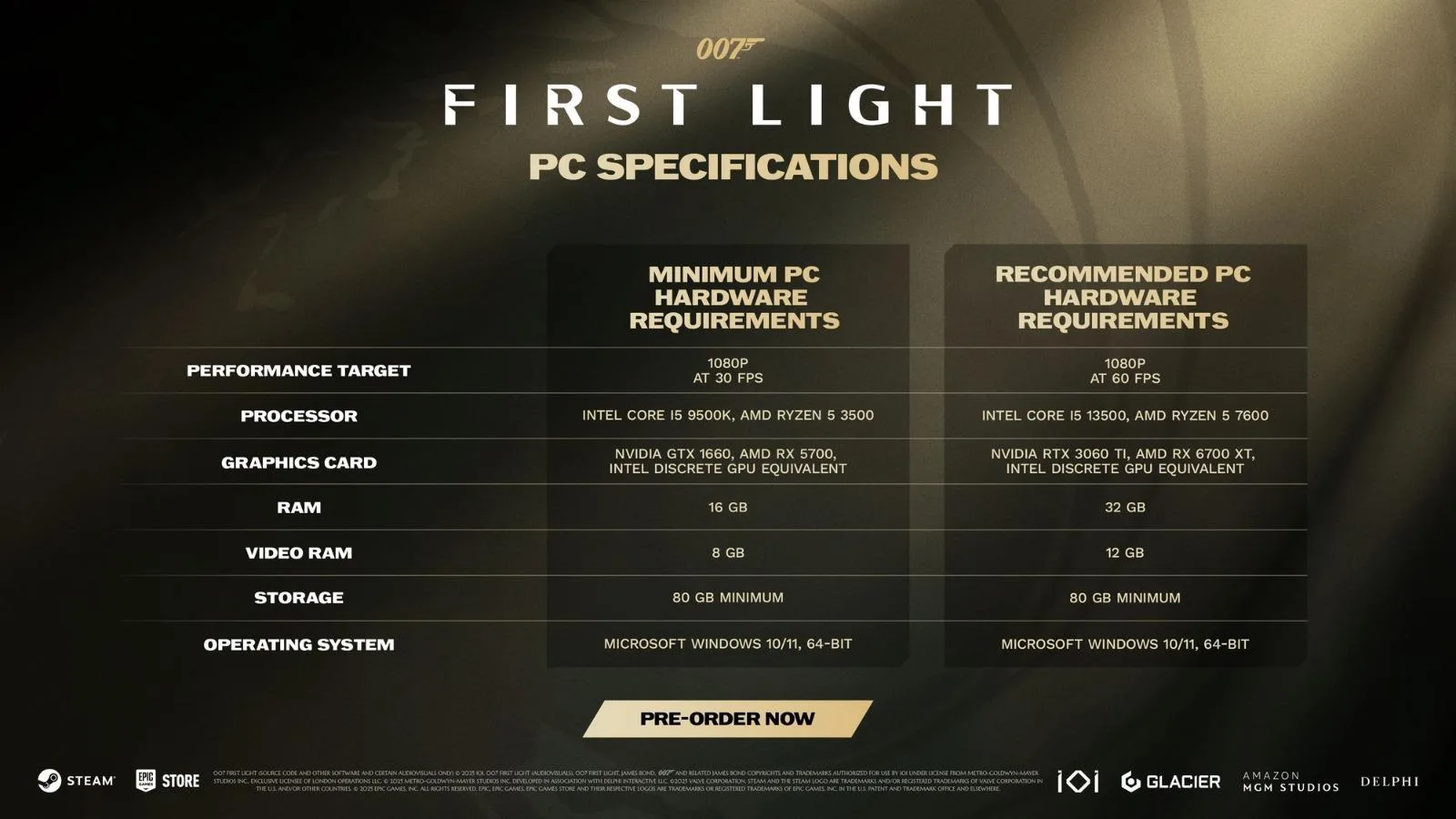 Official minimum vs recommended PC requirements. © IO Interactive
| Setting | Recommended value | Why |
|---|---|---|
| Display mode | Fullscreen | Best latency and consistent frame pacing |
| Resolution | Native panel resolution | Let the upscaler handle the internal render scale |
| V-Sync | On (Interval 1) | Removes tearing; turn Off if you run a VRR/G-Sync display |
| Transfer function | 2.2 | Standard gamma curve recommended by guides |
| Resolution scaling | DLSS (NVIDIA) / FSR (AMD) | The single biggest FPS gain; also sharper than native TAA |
| Frame generation | Dynamic (DMFG) on RTX 50; 2x on older RTX | Big perceived-FPS boost; DMFG only kicks in when needed |
| Texture quality | High (Ultra only with 12 GB+ VRAM) | Largest VRAM drain — lower this first if the VRAM bar maxes out |
| Texture filter | 8x (16x if you have headroom) | Cheap clarity on distant/angled surfaces |
| Terrain quality | High | Minimal FPS cost; visibly better in driving sequences |
| Level of detail | Ultra | Only ~2 FPS cost, so no reason to lower it |
| Shadow quality | High (Medium to chase FPS) | One of the heaviest costs — lower before textures |
| Volumetric fog | High (Medium to chase FPS) | Heavy effect; drop to Medium if under 60 FPS |
| Volumetric effects | Medium–High | Reduce alongside fog when you need frames |
| Global illumination | High | Strong visual payoff at a reasonable cost |
| Reflection quality | High (Ultra if you have headroom) | Expensive — drop early on weaker GPUs (the game is rasterized at launch; ray-traced/path-traced reflections arrive in the summer 2026 update) |
| Motion blur & post effects | On (personal taste) | Film grain, chromatic aberration, etc. have negligible FPS cost; turn off for a cleaner look |
Note: anti-aliasing and ambient occlusion are not exposed as separate options — AA is handled by the DLSS/FSR upscaler.
| Your resolution | Recommended upscaling mode |
|---|---|
| 4K (2160p) | Performance (Balanced if you have GPU headroom) |
| 1440p | Balanced (Quality if you have GPU headroom) |
| 1080p | Quality (drop to Balanced only if you still need FPS) |
Frame Generation:
| Console | Mode | Target | Internal res | Upscaler |
|---|---|---|---|---|
| Base PS5 | Performance | 60 FPS | ~720p | FSR 3.1.5 |
| Base PS5 | Quality | 30 FPS | ~1080p | FSR 3.1.5 |
| PS5 Pro | Single mode (Quality visuals @ 60) | 60 FPS | Higher | PSSR 2 |
Max FPS
Best image quality